Android is now 6 years old. Over the years, Android was able to command over 80% of the market, while leaving iOS and Windows Mobile/Phone behind. Thus, this moment is ripe to look back at how the story of the little green robot began.
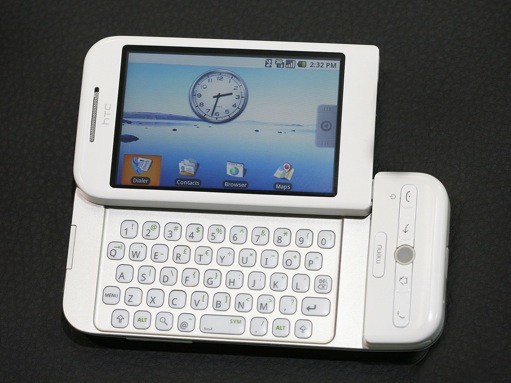
Android was presented in November 2007, but September 22, 2008 marked the “real” beginning. On that day, the HTC Dream (also known as the T-Mobile G1) was presented. The beginning wasn’t nice and easy, though. Many critics claimed that the OS would never be able to beat out those made by Apple and Microsoft. At the time, these opinions were quite valid. After all, Android back then greatly differed from the highly customized builds now released by Sony, LG, HTC, and Samsung.
Early versions of Android were meant to call, send and receive text messages, and connect to the Internet. The thing that made Android unique was that it was open source, and users were able to contribute to the code to add in innovative ideas.
But let’s go back to the HTC Dream for a bit. The device was presented at one of the very first Android conferences. Its technical specifications were outstanding for the time: Qualcomm MSM 7201A ARM 11 CPU running at 528 MHz, 256 MB of internal memory, and 192 MB of RAM. Compared to many other devices of the era, this was something beyond imagination. The phone initially packed Android 1.0, upgradeable to Android 1.6 Donut.
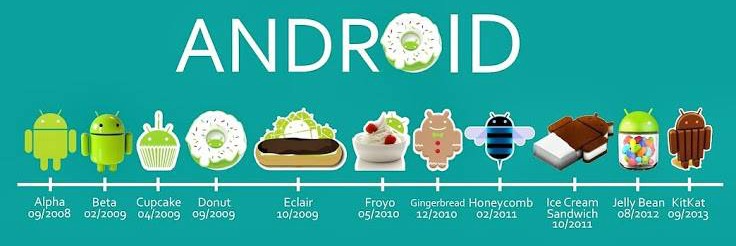
Version 1.0 had many unique features such as the Android Market (now known as the Google Play Store), which gave users the option to obtain hundreds of applications to enhance the initial capabilities of the phone. Contacts were stored in the cloud and integrated with Gmail. The OS also had a fully functional Internet browser. At first, Google didn’t use confectionary codenames like Cupcake, Donut, or Eclair. This was just Android 1.0—though Android 1.1 was codenamed Petit Four and there were some other milestone released named Astro Boy and Benderalong the way.
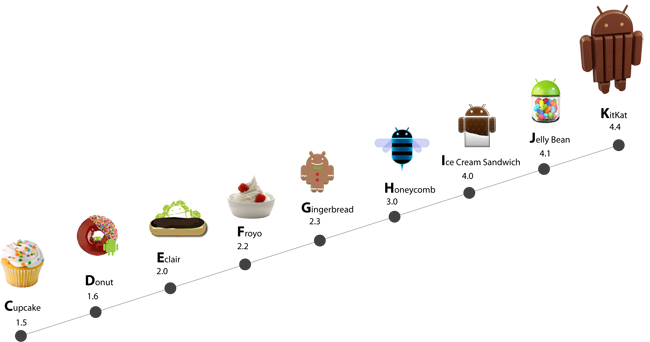
Android 1.5 Cupcake offered many improvements. The first big step was a kernel upgrade to version 2.6.27, which made the system more stable. Also, widgets were presented and they are still widely used now 4 years later. For the first time, users were able to install custom keyboards. The last big improvement was implementing copy/paste.
Android 1.6 Donut premiered 4 months later, but it was essentially an upgraded Cupcake build that didn’t bring much user-facing innovation except screenshots in the Android Market and the ability to select multiple photos for removal from the Gallery.

The next big step in Android Development was Android 2.0/2.1 Eclair. The kernel was once again updated, this time to version 2.6.29. The contact synchronization system was revamped, and offered an ability to add Email addresses. Speaking of which, a standalone Email application was introduced, as well as support for Bluetooth 2.1. The camera app in Eclair added support for device flashes, as well as zooming and setting white balance. The UI was also optimized, increasing scrolling speed, and allowing users to select Live Wallpapers as backgrounds. Version 2.1 was also a big update because for the first time, Google decided to release a phone: the HTC-made Google Nexus One. Since then, their branded devices all donned the moniker Nexus. Many believe that the name derived from Philip K. Dick’s Nexus 6.
Android 2.2 Froyo (a regional abbreviation for frozen yogurt) was presented in May 2010. The main objective of this update was to improve the system speed, as evidenced by the introduction of a JIT (Just-in-Time) compiler into Dalvik. The connectivity was also revamped, allowing for Internet tethering via USB and WiFi. Finally, the browser app was updated to support GIFs and Flash player—something that was later dropped when Chrome replaced the AOSP browser. In Q4 2010, Android was available on 1/3 of American smartphones, finally overtaking iOS. Since then, Android was seen as a major mobile player.
The Google Nexus S was the first smartphone that shipped with Android 2.3 Gingerbread. It was also the first Nexus device produced by Samsung. This was a major step, as Samsung has grown to become the biggest smartphone manufacturer today. The device was almost the same as Samsung Galaxy S, a highly regarded legacy device. Gingerbread was a very successful operating system, which in time became the most popular version of the mobile OS. Android 2.3 offered native support for new sensors such as NFC, gyroscope, and barometer. And for the first time, Android was given API support for front and rear cameras rather than device-specific implementations such as what was originally seen on the HTC Evo 4G. The OS was fast and reliable, and it can still be found on various legacy devices.
It is impressive that such a small player became one of the most pervasive operating systems of all times. But for now, let’s pause this story. Next week, we’ll continue with Google’s later releases.
A long time ago in a galaxy far, far away—located in Mountain View, the first version of the operating system dedicated for tablets was born. Google called it 3. 0 Honeycomb and presented it alongside the Motorola Xoom.
For the first time, the company decided to leave the source code closed. Clearly, they were trying to implement some unique features—and they did. Notification area toggles were introduced and graphics rendering was transferred to the Graphic Processing Unit (GPU), making the system much more responsive with increased UI performance. And speaking about performance, that was the first time where more than one core was used in a popular Android device—a trend which has continued now with our ongoing specifications war.

The next version introduced by Google was 4.0 Ice Cream Sandwich. Aimed at both phones and tablets alike, Google launched the OS alongside a very popular device: the Samsung Galaxy Nexus. ICS was released on October 19th, 2011. For the first time, the Linux 3.0.1 kernel was used, and most of features known from Honeycomb were ported. The GNex lacked physical buttons, which were replaced by software equivalents. The purpose of this was to maximize the available 4.65″ screen area. Users were able to unlock the phone just by looking at their devices, and Holo, which was first showcased in rudimentary form in Honeycomb, was refined.

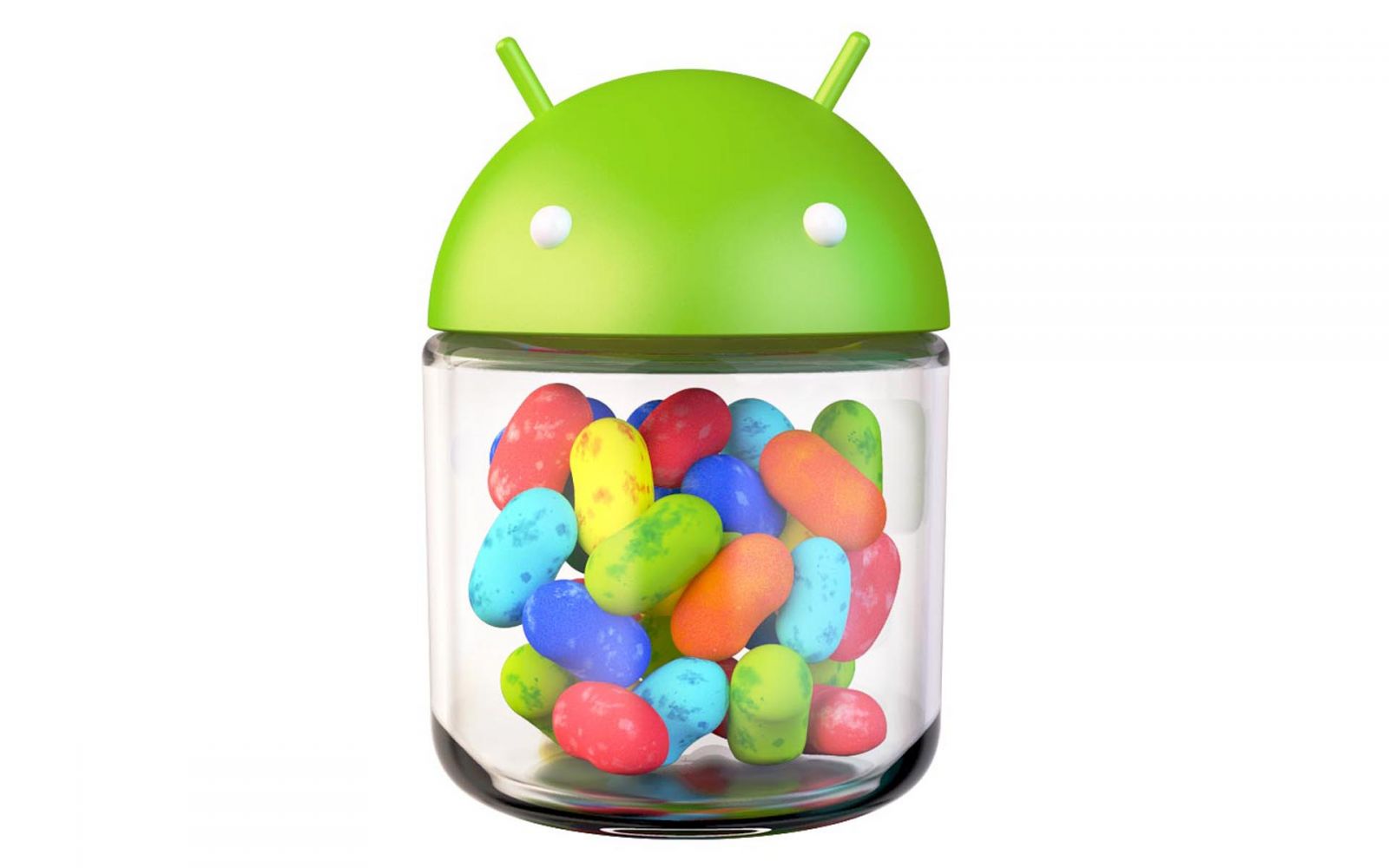
Half a year after ICS was introduced, Google unveiled Android 4.1 Jelly Bean. Google released 4.1 with the Asus-manufactured Google Nexus 7. Jelly Bean was spread into three major updates: 4.1, 4.2, and 4.3. These three combined eventually went on to became the most popular version of the operating system, currently accounting for more than 50% of Android devices that have access to Google Play.
Android 4.1 brought various improvements such as Project Butter, richer notifications, indoor maps, Google Now, and much more. Android 4.2 was first seen on the incredibly popular LG-sourced Google Nexus 4. Then, the Asus-made Google Nexus 7 (2013) first showcasedAndroid 4.3, which brought various enhancements such as the previously covered SELinux. Along the way, the camera software received various updates such as the swipe-to-dismiss UI paradigm, Photosphere, and more.
Around this time, much speculation arose that the next version of Android would be version “5.0 Key Lime Pie.” However, we now all know that the next version eventually became Android 4.4 KitKat.
The new OS was released on Halloween 2013, alongside the highly anticipated LG-sourced Google Nexus 5. There were a substantial number of feature additions in this version, but one of the main objectives was to make the OS run better on lower end devices, such as those with only 512 megs of RAM. The new ART compiler was also introduced in 4.4, and it’s quite possible that it will replace Dalvik in the future after further refinement.
However, not all is well with Android’s latest version, as many are worried that in an attempt to regain some control over the platform, Google may make the system almost unusable without their closed source applications. Unfortunately, they have already decided to abandon many of the previous AOSP applications in favor of closed source, Google applications. These include Chrome, Hangouts, and the new Google Experience Launcher. While this may not mean much for end users now, nobody knows what this will hold for the future of the platform.
Over the last six years, Android has changed from that cute little green robot to the massive force that it is today. Google is now the biggest player in the mobile market, and the majority of new smartphones are running Android. This success is driven in part by the freedom and customization that the software affords. New OEMs can make modifications such as TouchWiz or Sense, and add extra extra features on top of the already feature-packed OS. That said, we can only hope that Google will rethink its course regarding replacing open source applications with proprietary counterparts, as this eventually takes away the freedom that we have all grown to love.
Credit:Eagleeyetom@xdadevelopers
 Android 1.5 Cupcake
 Android 1.6 Donut
 Android 2.0 – 2.1 Eclair
 Android 2.2 – 2.3 Froyo

 Android 4.0 Ice Cream Sandwich
 Key features in this version of Android: larger, rich, and actionable notifications, Google Now, offline voice dictation, streamlined UI, performance improvements “Project Butter”, smart widget placement, multi-user profiles for tablets (4.2), lock screen widgets (4.2), daydream (4.2), OpenGL ES 3.0 (4.3), Bluetooth Smart Ready (4.3), restricted user profiles for tablets (4.3)